어플 리뷰 분석 프로젝트를 진행하던 중에 hanspell이라는 네이버 맞춤법 검사기 라이브러리가 있다는 것을 알게 됐다.
그러나 최근에 라이브러리 업뎃이 되지 않아 매번 바뀌는 passportKey를 코드로 직접 가져와야 했는데 이번엔 result 오류가 발생했다..

고민하던 와중에 팀원이 오류 해결에 성공했다! 해결 방법은 아래와 같다(코랩에서 실행).
해결 방법
코랩에서 아래 순서대로 코드를 실행한다.
!pip install git+https://github.com/Seokhyeon-Park/hanspell.git!pip show hanspell
pip show hanspell을 한 후 출력된 Location부분을 복붙해 아래 코드의 spell_checker_file_path의 hanspell 앞에 붙인다.
# 오류 수정 코드

import re
import requests

def get_passport_key():
    """네이버에서 '네이버 맞춤법 검사기' 페이지에서 passportKey를 획득

        - 네이버에서 '네이버 맞춤법 검사기'를 띄운 후
        html에서 passportKey를 검색하면 값을 찾을 수 있다.

        - 찾은 값을 spell_checker.py 48 line에 적용한다.
    """

    url = "https://search.naver.com/search.naver?where=nexearch&sm=top_hty&fbm=0&ie=utf8&query=네이버+맞춤법+검사기"
    res = requests.get(url)

    html_text = res.text

    match = re.search(r'passportKey=([^&"}]+)', html_text)
    if match:
        passport_key = match.group(1)
        return passport_key
    else:
        return False


def fix_spell_checker_py_code(file_path, passportKey):
    """획득한 passportkey를 spell_checker.py파일에 적용
    """

    pattern = r"'passportKey': '.*'"

    with open(file_path, 'r', encoding='utf-8') as input_file:
        content = input_file.read()
        modified_content = re.sub(pattern, f"'passportKey': '{passportKey}'", content)

    with open(file_path, 'w', encoding='utf-8') as output_file:
        output_file.write(modified_content)

    return


# before run
spell_checker_file_path = '/usr/local/lib/python3.11/dist-packages/hanspell/spell_checker.py' # 여기에 hanspell 앞에 Location 경로가 들어가도록 입력!

passport_key = get_passport_key()
if passport_key:
    fix_spell_checker_py_code(spell_checker_file_path, passport_key)
else:
    print("passportKey를 찾을 수 없습니다.")
from hanspell import spell_checker
text = '나는 며칠간 동생의 뒤치닥거리를 했다'

spelled_sent = spell_checker.check(text)
checked_sent = spelled_sent.checked
print(checked_sent)
그 후 코드를 실행하면 !
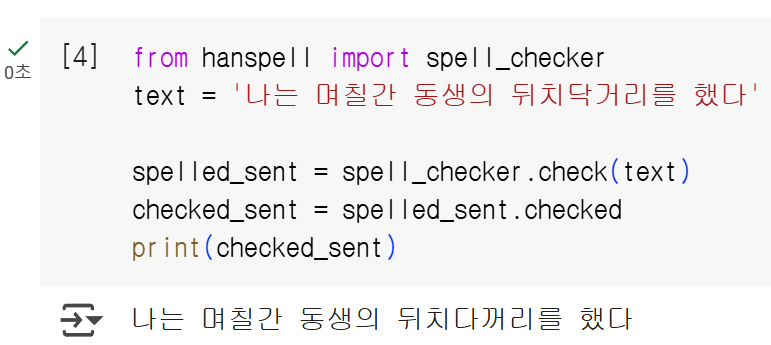
문제 없이 실행되는 모습을 볼 수 있다.
아래에 코랩도 첨부해두겠다!
https://colab.research.google.com/drive/1sCqGsSPHu9aFNCeZetHO3VNQzVg_2Hon?usp=sharing
hanspell_250127.ipynb
Colab notebook
colab.research.google.com